
Hiding features from your dashboard
Hide features you don't need from your navigation menu to keep your dashboard clean and focused.
Not using every feature in WedSites? You can hide the ones you don't need to keep your navigation clean and simple.
What this does
Hiding features removes them from your navigation menu. You won't see them when you're working on your wedding, which makes it easier to focus on what you actually need.
This is different from user permissions. Hiding features affects your own view of the dashboard. User permissions control what other people can access.
Which features you can hide
As the account owner, you can hide features you're not using. This might include:
- Planning tools if you're just using WedSites for your website
- Ecards if you're sending paper invitations
- Budget tools if you're tracking expenses elsewhere
- Vendor management if you don't need it
- Any other features that aren't relevant to how you're using WedSites
How to hide features
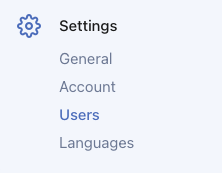
- Go to Settings > Users and click on your own user
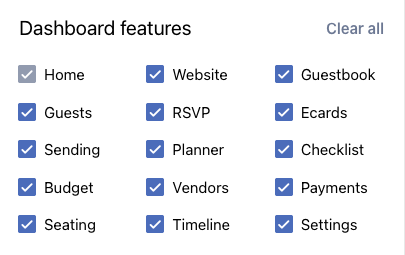
- In the Dashboard features section, uncheck the features you want to hide
- Click Save changes
The features disappear from your navigation right away.
Showing features again
Changed your mind? You can show hidden features anytime.
- Go to Settings > Users and click on your own user
- In the Dashboard features section, check the boxes for features you want to see again and click Save changes
Everything comes back just like it was. Nothing gets deleted when you hide features, they're just tucked away.
Why you might want to hide features
Keep things simple. If you're only using WedSites for your website and RSVPs, hide the planning tools you're not using.
Reduce overwhelm. Wedding planning has enough going on. Hide what you don't need so you can focus on what matters.
Cleaner navigation. Fewer menu items means it's easier to find what you're looking for.
What happens to your data
Hiding a feature doesn't delete anything. If you've already added budget items or vendor contacts, they're still there. You just can't see them until you show the feature again.
Your hidden features are basically just minimized. Everything's safe and waiting if you need it later.
This only affects you
If you've added other users to your account, hiding features on your dashboard doesn't hide them for everyone else. Each person sees the features based on their permissions.
If you want to control what other people see, you'll need to manage their user permissions instead. Check out our article on managing permissions for your wedding team.
Tips for customizing your dashboard
Start by hiding what you know you won't use. You can always show things later if you need them.
Review as you plan. Your needs might change as you get closer to your wedding. Show or hide features as needed.
Don't hide too much. Make sure you keep the features you actually need easy to access.
Common setups
Website only: Hide guest list, RSVP, ecards, and all planning tools. Just keep website features.
Website and RSVP: Hide planning tools like budget, vendors, and timeline. Keep website, guests, and RSVP.
Everything: Don't hide anything. Use WedSites for complete wedding planning.
Pick whatever works for how you're using WedSites. There's no wrong way to set it up!