
Upgrading your plan
Upgrade to a higher plan anytime to unlock new features while keeping all your existing content and settings.
Ready for more features? You can upgrade your WedSites plan anytime, including from the free trial. It's super easy and everything you've already created comes with you.
How to upgrade
- Go to Settings in your main navigation
- Click Account
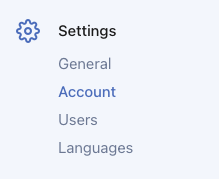
- Find the plan section and pick your new plan
- Follow the prompts to complete your upgrade
That's it! Your new features will be ready to use right away.
What happens when you upgrade
Your content stays exactly the same. All your pages, sections, photos, guest lists, everything you've worked on stays put. Nothing gets deleted or changed.
New features unlock immediately. As soon as your payment goes through, you can start using your new features. No waiting around.
You only pay the difference. We'll charge you a one-time payment for the difference between your old plan and new plan. That's it. No recurring charges or billing cycles.
Your website keeps running. There's no downtime. Your guests can still visit your site while you're upgrading.
Common upgrades
Free trial to any paid plan
When you're ready to publish your wedding website and share it with guests, upgrade to any paid plan. All your designs, content, and settings carry over.
Basic to Standard
You'll get access to:
- Online RSVP form
- Guest list management
- Email invitations and reminders
- Save the date and invitation ecards
- Email tracking
- 24 months of hosting included
This is perfect when you're ready to start collecting RSVPs online instead of tracking paper cards.
Standard to Pro
You'll get access to:
- Multiple languages
- Wedding checklist
- Budget planner
- Vendor management
- Payment tracking
- Seating chart
- Timeline builder
- 24 months of hosting
This is great when you want all your planning tools in one place.
Basic to Pro
You'll get everything from both Standard and Pro. All the RSVP tools plus all the planning features, including 24 months of hosting.
Billing and payment
When you upgrade, here's how payment works:
One-time payment: You pay the difference between your current plan and your new plan. That's it. There are no recurring charges or subscriptions.
Payment method: We'll use the same payment method you have on file. Make sure it's up to date before upgrading.
What if I need help?
If you're not sure which plan to upgrade to, check out our article on plan features and pricing. It breaks down what's included in each plan.
Still have questions? Reach out to our support team and we'll help you pick the right plan for your needs.
Plans are per wedding
If you have multiple wedding accounts under your user account, each wedding has its own plan. Upgrading one wedding to Pro doesn't upgrade your other weddings. Each one needs to be upgraded separately.
This means you can have different plans for different weddings if you like. For example, one wedding on Pro and another on Standard.
Can I downgrade?
We don't have a way to downgrade plans right now. If you're thinking about switching to a lower tier plan, get in touch with our support team and we'll see what we can do to help.